Disk Mop vs CleanMyMac X: 2026 Comparison
CleanMyMac X is the most popular cleaning tool for macOS. But it only works on Mac and costs significantly more. Disk Mop offers cross-platform support at a fraction of the price.
CleanMyMac X by MacPaw is a highly popular disk cleaning and optimization tool for macOS users. Known for its polished interface and comprehensive features, it commands a premium price — $39.95/year or $89.95 one-time.
Disk Mop works on both Windows and macOS, offering a one-time $19.90 payment for all features. It delivers many of CleanMyMac X's core capabilities at a much more affordable price.
Key Takeaways
- CleanMyMac X costs $89.95 one-time (or $39.95/yr), whereas Disk Mop costs just $19.90 for a lifetime license.
- CleanMyMac X is macOS-only, while Disk Mop supports both macOS and Windows with the same purchase.
- Disk Mop clears bloated macOS System Data, user caches, and duplicate media with cryptographic precision.
- Disk Mop has zero heavy background daemons, running lightning-fast without consuming system resources.
More Features, Less Cost: Try Disk Mop
DiskMop automatically scans, identifies, and safely cleans hidden caches, app leftovers, and system junk.
Comparison Table
| Feature | Disk Mop | CleanMyMac X |
|---|---|---|
| Price | $19.90 (one-time) | $39.95/year or $89.95 |
| Platform Support | Windows & macOS | macOS only |
| Disk Analysis | ✓ Visual analysis | ✓ Space Lens |
| Large File Finder | ✓ 500MB+ | ✓ |
| Duplicate Finder | ✓ SHA-256 | ✓ |
| Malware Protection | ✗ | ✓ |
| App Uninstaller | ✗ | ✓ |
| Windows Support | ✓ Windows 10/11 | ✗ |
| Startup Manager | ✓ | ✓ (Optimization) |
| Value for Money | ⭐⭐⭐⭐⭐ | ⭐⭐⭐ |
| File Shredder | ✓ DoD 5220.22-M | ✓ Shredder |
| Disk Treemap | ✓ Interactive | ✓ Space Lens |
| RAM Optimizer | ✓ | ✓ (Maintenance) |
| Privacy Report | ✓ Comprehensive | ✓ Privacy |
| Disk Health (SMART) | ✓ | ✗ |
| Visual Duplicates | ✓ Perceptual hash | ✗ |
| Service Manager | ✓ | ✗ |
Disk Mop
Pros
- One-time $19.90 — about 1/4 the price of CleanMyMac
- Both Windows and macOS support
- Visual disk analysis
- SHA-256 duplicate detection
- Large file finder
- Clean, fast interface
Cons
- No malware scanning
- No app uninstaller
- Limited macOS-specific optimizations
CleanMyMac X
Pros
- Comprehensive macOS optimization tools
- Built-in malware protection
- App uninstaller and updater
- Premium, polished interface
- Deep macOS integration
Cons
- macOS only — no Windows support
- $39.95/year or $89.95 one-time
- Too expensive for basic cleaning
- Very limited free version
- Canceling subscription removes all features
Price Difference: 9x
CleanMyMac X's one-time price is $89.95 — about 4.5 times more than Disk Mop. The annual subscription at $39.95/year adds up to about $120 over 3 years.
Disk Mop provides lifetime access for a one-time $19.90. Considering both share core features like cleaning, duplicate detection, and disk analysis, Disk Mop offers far better value.
Platform Support: Single vs Cross-Platform
CleanMyMac X only works on macOS. If you use both Mac and Windows, you need separate solutions.
Disk Mop supports Windows 10/11 and macOS 12+ with a single license. Switch platforms without buying another tool.
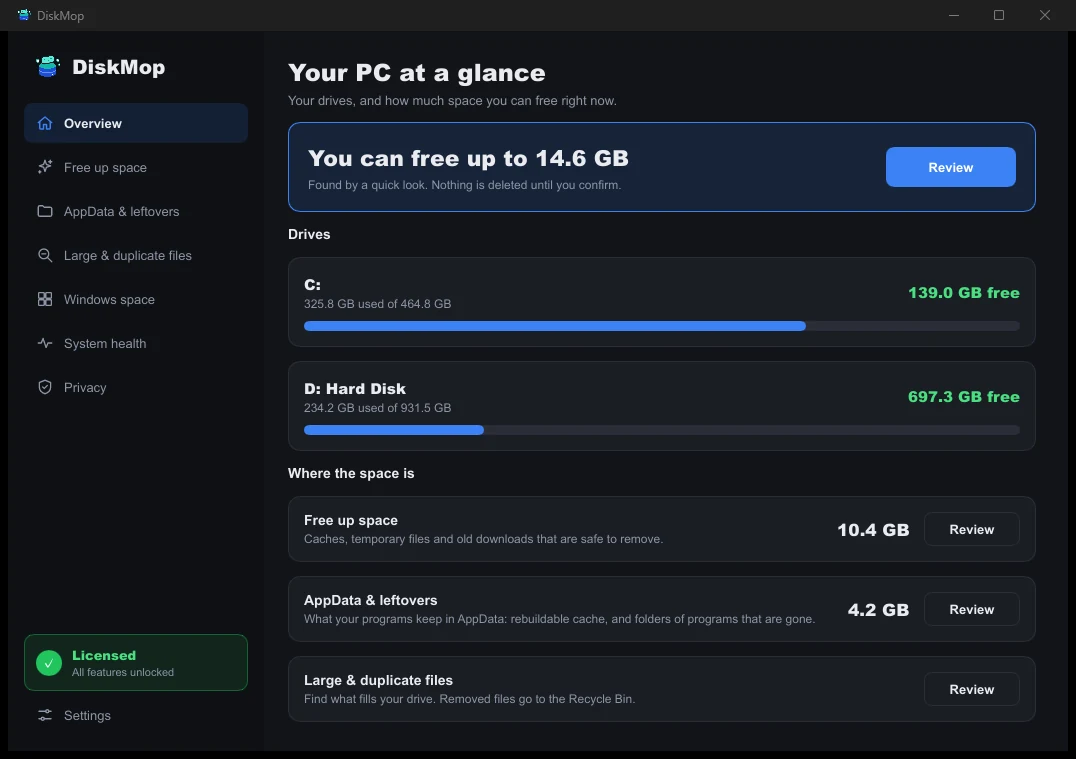
How DiskMop Solves This: Overview
See all your disk usage on a single screen. Instantly identify areas that can be cleaned.
Feature Depth
CleanMyMac X offers macOS-specific extras like malware scanning, app uninstalling, and Mail attachment cleanup. If you're a Mac-only user who needs these advanced features, CleanMyMac X is more comprehensive.
However, the core features most users actually need — clearing Mac system data, cache cleaning, large file finding, and duplicate detection — are all available in Disk Mop. For a visual comparison with other Mac utilities, see our Disk Mop vs DaisyDisk review.
Frequently Asked Questions
Can Disk Mop replace CleanMyMac X on macOS?
Yes. Disk Mop performs core storage maintenance including System Data cleanup, interactive treemap analysis, large file discovery, and photo deduplication at a fraction of the cost.
Can I use my Disk Mop license on both a Mac and a Windows PC?
Yes. Unlike CleanMyMac which is strictly limited to macOS, Disk Mop provides full cross-platform compatibility across Mac and Windows.
How does the pricing compare between CleanMyMac X and Disk Mop?
CleanMyMac X costs $89.95 for a one-time perpetual license or $39.95/year subscription. Disk Mop is a one-time purchase of $19.90 for lifetime updates.
Verdict
CleanMyMac X is a capable optimization tool for macOS when dealing with a full Mac startup disk, but its Mac-only support and high price tag are dealbreakers for many.
Disk Mop covers essential disk cleaning needs on both Windows and macOS at about a ninth of CleanMyMac X's price. Unless you need malware scanning and app uninstalling, Disk Mop is the smarter choice.
More Features, Less Cost: Try Disk Mop
DiskMop automatically scans, identifies, and safely cleans hidden caches, app leftovers, and system junk.
Is your iPhone running out of space too?
DiskMop for iPhone finds duplicates, similar shots, screenshots and large videos in your photo library. Scanning is free and photos are analyzed on the device.