Disk Mop vs Glary Utilities: 2026 Comparison
Glary Utilities packs 20+ tools into one package. But sometimes less is more — Disk Mop focuses on disk cleaning and delivers a better experience.
Glary Utilities by Glarysoft is a comprehensive system tool package offering disk cleaning, registry cleaning, file shredder, encryption tools, and many more features.
However, packing 20+ tools together makes the software complex and confusing. Disk Mop focuses solely on disk cleaning, delivering a simpler, faster, and more effective experience.
Key Takeaways
- Glary Utilities bundles dozens of legacy utilities in a cluttered UI, with questionable registry cleaning tools.
- Glary Utilities Pro requires a recurring $19.97/year subscription, while Disk Mop provides lifetime access for $19.90.
- Disk Mop replaces bloat with a streamlined modern toolkit: interactive treemap analysis, SHA-256 duplicate detection, and RAM freeing.
- Glary Utilities is Windows-only; Disk Mop natively supports both Windows and macOS.
End the Complexity: Try Disk Mop
DiskMop automatically scans, identifies, and safely cleans hidden caches, app leftovers, and system junk.
Comparison Table
| Feature | Disk Mop | Glary Utilities |
|---|---|---|
| Price | $19.90 (one-time) | Free / Pro $19.97/year |
| Platform Support | Windows & macOS | Windows only |
| Focus | Disk cleaning specialist | All-in-one toolkit |
| Disk Analysis | ✓ Visual analysis | ✓ Disk Space Analyzer |
| Large File Finder | ✓ 500MB+ | ✗ |
| Duplicate Finder | ✓ SHA-256 | ✓ Duplicate Files Finder |
| Registry Cleaner | ✗ (by design) | ✓ |
| Learning Curve | Easy — anyone can use it | Complex — 20+ tools |
| Startup Manager | ✓ | ✓ |
| Bloatware Risk | ✗ Clean install | ⚠ Toolbar/bundleware |
| File Shredder | ✓ DoD 5220.22-M | ✗ |
| Disk Treemap | ✓ Interactive | ✗ |
| RAM Optimizer | ✓ | ✓ |
| Disk Health (SMART) | ✓ | ✗ |
| Visual Duplicates | ✓ Perceptual hash | ✗ |
| Scheduled Cleanup | ✓ | ✓ |
Disk Mop
Pros
- 100% focused on disk cleaning
- Windows and macOS support
- Simple, clear interface
- One-time $19.90 — lifetime access
- Large file finder (500MB+)
- No bundleware/toolbar risk
- Full privacy — no data collection
Cons
- No registry cleaning
- No file shredder/encryption
- Fewer total tools than Glary
Glary Utilities
Pros
- 20+ system tools in one package
- Registry cleaner
- File shredder and encryption
- Disk analysis
- Duplicate file finder
- Free basic version
Cons
- Windows only — no macOS
- Very complex interface
- Pro version $19.97/year subscription
- Bundleware/toolbar risk during install
- No large file finder
- Unnecessary tools may slow system
Focused vs All-in-One
Glary Utilities is like a Swiss Army knife — it has everything but excels at nothing. Most of its tools like registry cleaning and file encryption are features average users never need.
Disk Mop focuses on one thing: disk cleaning. And it does it excellently. Visual analysis, large file finder, duplicate detection, cache cleaning, startup manager — all designed for reclaiming disk space.
The Pricing Trap
Glary Utilities' free version offers basics, but advanced features are locked behind Pro at $19.97/year. Over 3 years, that's about $60.
Disk Mop provides lifetime access to all features for one-time $19.90. No subscription tracking, no renewal surprises.
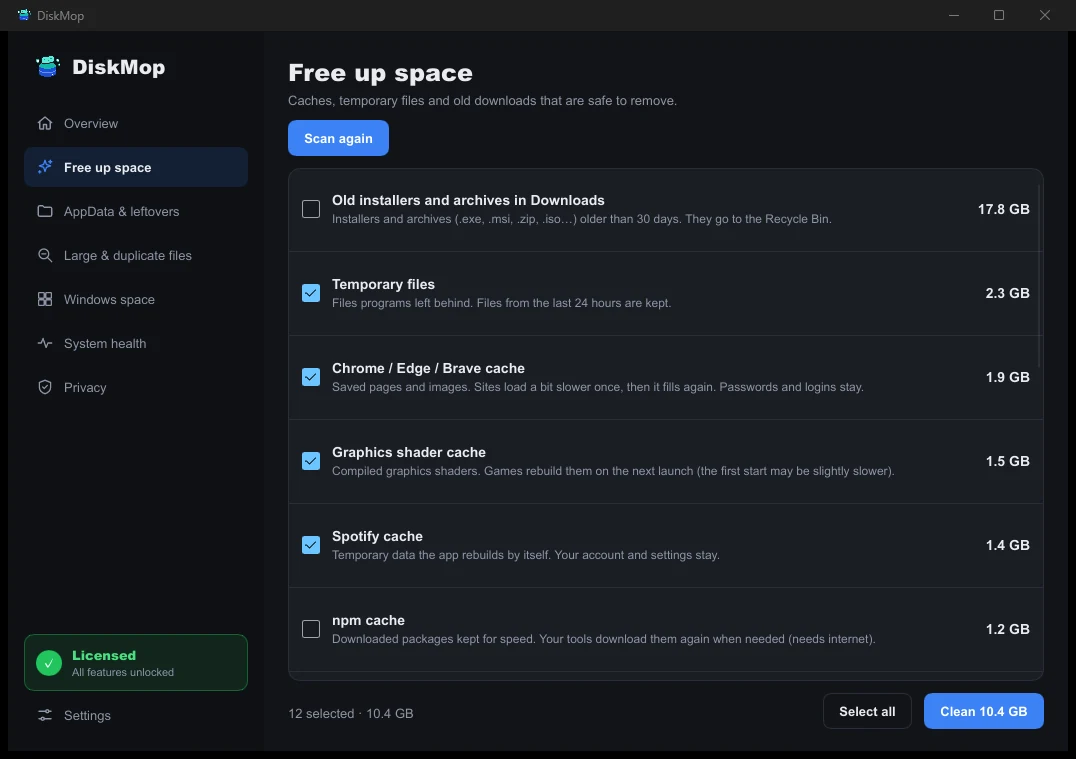
How DiskMop Solves This: Speed Up
Run all cleanup tasks with one click. Old downloads, cache, browser data, and recycle bin are cleaned automatically.
Security and Clean Install
Glary Utilities installation may include toolbar or additional software offers that can be accidentally installed if you're not careful.
Disk Mop's installation is clean and straightforward. No extra software, no toolbars, no ads.
Frequently Asked Questions
How does Glary Utilities compare to Disk Mop?
Glary Utilities is an old-school multi-tool bundle with legacy registry cleaners. Disk Mop offers a focused, safe, and modern workflow centered around visual treemaps, duplicate file purging, and browser cache cleaning.
Is registry cleaning in Glary Utilities necessary on Windows 11?
No. Microsoft advises against registry cleaners on modern Windows. They carry risk of corruption without measurable speed gains. Disk Mop focuses strictly on verified junk and storage reclaiming.
Can I use Glary Utilities on a Mac?
No. Glary Utilities only runs on Windows. Disk Mop supports both macOS and Windows with a single license.
Verdict
Glary Utilities is functional for advanced Windows users needing niche features like registry cleaning and file encryption. But for most users, it's overly complex.
For a clean, reliable, cross-platform disk cleaning solution, Disk Mop is the right choice. One-time payment, clean installation, and a focused feature set.
End the Complexity: Try Disk Mop
DiskMop automatically scans, identifies, and safely cleans hidden caches, app leftovers, and system junk.