Disk Mop vs Wise Disk Cleaner: 2026 Comparison
Wise Disk Cleaner is free and popular on Windows, but lacks macOS support, duplicate detection, and visual disk analysis.
Wise Disk Cleaner by WiseCleaner is a popular free disk cleaning tool for Windows. It offers basic cleaning, browser cache clearing, and a big files manager.
Disk Mop provides cross-platform support, visual disk analysis, SHA-256 duplicate detection, and a modern interface. Which one fits your needs better?
Key Takeaways
- Wise Disk Cleaner is a basic legacy Windows cleaner that includes promotions and upsells in its interface.
- Wise Disk Cleaner lacks visual treemap drive exploration and cryptographic SHA-256 duplicate detection.
- Wise Disk Cleaner is strictly Windows-only, whereas Disk Mop delivers native cross-platform support for macOS and Windows.
- Disk Mop offers a modern, ad-free interface with strict offline privacy guarantees.
Smarter Cleaning with Disk Mop
DiskMop automatically scans, identifies, and safely cleans hidden caches, app leftovers, and system junk.
Comparison Table
| Feature | Disk Mop | Wise Disk Cleaner |
|---|---|---|
| Price | $19.90 (one-time) | Free |
| Platform Support | Windows & macOS | Windows only |
| Disk Analysis | ✓ Visual analysis | ✗ |
| Large File Finder | ✓ 500MB+ | ✓ Big Files Manager |
| Duplicate Finder | ✓ SHA-256 | ✗ |
| Browser Cleaning | ✓ 4 browsers | ✓ |
| Scheduled Cleaning | ✗ | ✓ |
| Disk Defrag | ✗ | ✓ |
| Startup Manager | ✓ | ✗ |
| Interface | ⭐⭐⭐⭐⭐ Modern | ⭐⭐⭐ Average |
| File Shredder | ✓ DoD 5220.22-M | ✗ |
| Disk Treemap | ✓ Interactive | ✗ |
| RAM Optimizer | ✓ | ✗ |
| Disk Health (SMART) | ✓ | ✗ |
| Visual Duplicates | ✓ Perceptual hash | ✗ |
| Scheduled Cleanup | ✓ | ✗ |
Disk Mop
Pros
- Windows and macOS support
- Visual disk analysis
- SHA-256 duplicate detection
- Startup manager
- Modern, clean interface
- System health score
Cons
- Paid ($19.90 one-time)
- No scheduled cleaning
- No disk defrag
Wise Disk Cleaner
Pros
- Completely free
- Scheduled automatic cleaning
- Disk defragmentation
- Big files manager
- Lightweight and fast
Cons
- Windows only — no macOS
- No duplicate detection
- No visual disk analysis
- No startup manager
- Dated interface design
- May show bundleware suggestions
Platform: Locked to Windows vs Freedom of Choice
Wise Disk Cleaner is Windows-only. MacBook or iMac users have no option here.
Disk Mop supports both Windows 10/11 and macOS 12+ with a single license.
File Detection: Where Wise Falls Short
Wise Disk Cleaner lacks duplicate file detection — a critical feature for finding copies of photos, videos, and documents that waste disk space.
Disk Mop's SHA-256 duplicate finder safely detects exact copies. Its visual disk analysis also shows folder sizes at a glance — something Wise doesn't offer.
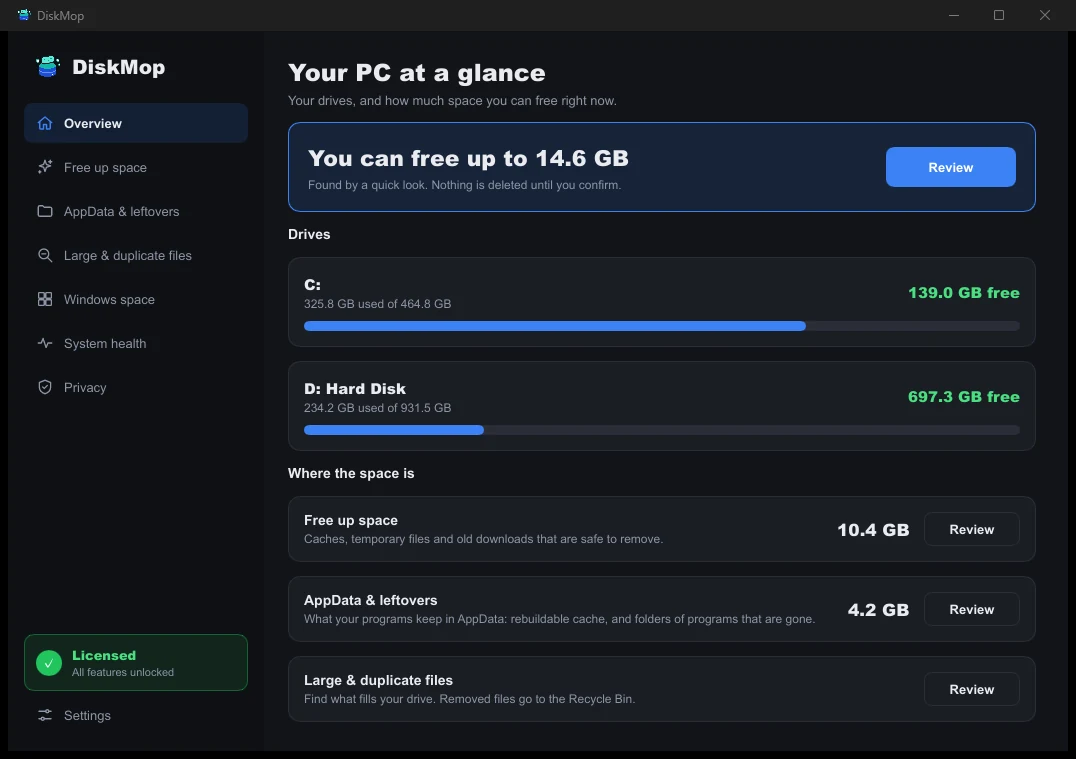
How DiskMop Solves This: Overview
See all your disk usage on a single screen. Instantly identify areas that can be cleaned.
Where Wise Wins
Wise Disk Cleaner offers scheduled cleaning and disk defragmentation — features not available in Disk Mop.
However, defrag is irrelevant for SSDs, and scheduled cleaning isn't essential for most users.
Frequently Asked Questions
What makes Disk Mop superior to Wise Disk Cleaner?
Wise Disk Cleaner is limited to conventional temporary file wiping. Disk Mop adds interactive treemap storage visualization, cryptographic duplicate file scanning, large file locators, and macOS compatibility.
Does Wise Disk Cleaner contain ads?
Yes, the free version displays promotional banners and prompts for other vendor utilities. Disk Mop is 100% ad-free and bundleware-free.
Can I run Wise Disk Cleaner on a Mac?
No. Wise Disk Cleaner is built exclusively for Windows. Mac users should use Disk Mop for macOS system cache and storage maintenance.
Verdict
Wise Disk Cleaner is a solid free option for Windows-only users. But for macOS support, duplicate detection, visual analysis, and a modern interface, Disk Mop's $19.90 offers a much more comprehensive experience.
Smarter Cleaning with Disk Mop
DiskMop automatically scans, identifies, and safely cleans hidden caches, app leftovers, and system junk.