Disk Mop vs BleachBit: 2026 Comparison
BleachBit is free and open-source, but its dated interface, lack of macOS support, and limited features leave room for modern alternatives like Disk Mop.
BleachBit is a free, open-source disk cleaner distributed under GPL. Popular among privacy-conscious users and the Linux community, it handles basic cache and temp file cleaning effectively.
However, BleachBit's interface is quite dated, it lacks macOS support, and doesn't offer modern features like disk analysis, large file finder, or duplicate detection. Disk Mop fills all these gaps.
Key Takeaways
- BleachBit is free and open-source, but lacks visual treemap analysis, duplicate file detection, and modern UI polish.
- Disk Mop combines deep cache cleaning with interactive treemaps, cryptographic SHA-256 deduplication, and RAM management.
- Disk Mop provides full native macOS support, whereas BleachBit on macOS remains experimental and limited.
- Disk Mop features built-in guardrails preventing accidental deletion of critical operating system files.
Modern Disk Cleaning: Try Disk Mop
DiskMop automatically scans, identifies, and safely cleans hidden caches, app leftovers, and system junk.
Comparison Table
| Feature | Disk Mop | BleachBit |
|---|---|---|
| Price | $19.90 (one-time) | Free (open-source) |
| Platform Support | Windows & macOS | Windows & Linux |
| macOS Support | ✓ macOS 12+ | ✗ |
| Disk Analysis | ✓ Visual analysis | ✗ |
| Large File Finder | ✓ 500MB+ | ✗ |
| Duplicate Finder | ✓ SHA-256 | ✗ |
| Cache Cleaning | ✓ | ✓ |
| Secure Deletion | ✗ | ✓ Overwrite |
| UI Quality | ⭐⭐⭐⭐⭐ Modern | ⭐⭐ Basic |
| System Health Score | ✓ 0-100 | ✗ |
| File Shredder | ✓ DoD 5220.22-M | ✗ |
| Disk Treemap | ✓ Interactive | ✗ |
| RAM Optimizer | ✓ | ✗ |
| Disk Health (SMART) | ✓ | ✗ |
| Visual Duplicates | ✓ Perceptual hash | ✗ |
| Scheduled Cleanup | ✓ | ✗ |
Disk Mop
Pros
- Modern, user-friendly interface
- macOS support (unavailable in BleachBit)
- Visual disk analysis
- Large file finder (500MB+)
- SHA-256 duplicate detection
- System health score
- Startup manager
- Professional support
Cons
- Paid ($19.90 one-time)
- Not open-source
- No Linux support
- No secure deletion (overwrite)
BleachBit
Pros
- Completely free and open-source
- Linux support
- Secure file deletion (overwrite)
- Trusted by privacy community
- Very lightweight
Cons
- Dated, complex interface
- No macOS support
- No disk analysis
- No large file finder
- No duplicate detection
- No startup manager
- No system health score
- No professional support
Free vs Paid: Which Offers More Value?
BleachBit's biggest advantage is being free. A natural choice for budget-conscious users or open-source advocates. But "free" doesn't always mean "best."
Disk Mop's one-time $19.90 fee quickly pays for itself with features BleachBit simply doesn't have: visual disk analysis, large file detection, and duplicate cleaning.
Platform Support
BleachBit works on Windows and Linux but offers no macOS support whatsoever.
Disk Mop supports both Windows 10/11 and macOS 12+ (Apple Silicon and Intel) with a single license.
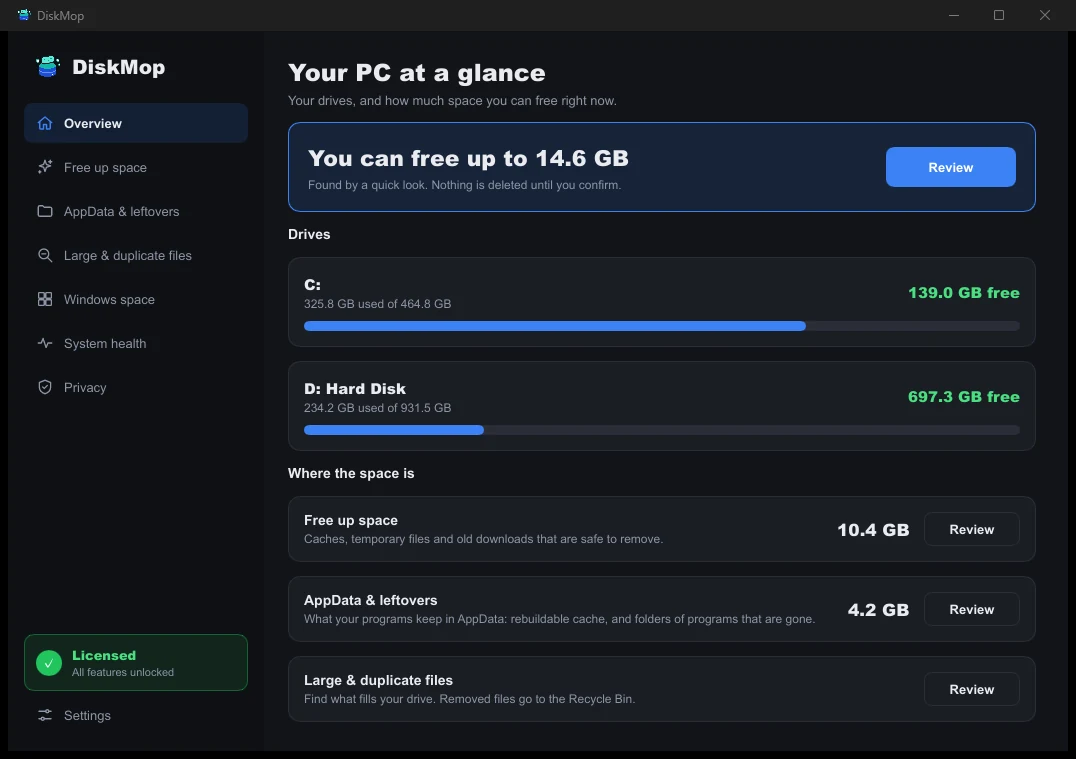
How DiskMop Solves This: Overview
See all your disk usage on a single screen. Instantly identify areas that can be cleaned.
User Experience: Night and Day
BleachBit's interface is functional but dated — a list of checkboxes requiring technical knowledge to use safely.
Disk Mop's modern interface makes everything visual and clear. Usage graphs, color-coded categories, and clear previews before deletion make it safe for anyone.
Frequently Asked Questions
Why choose Disk Mop over free open-source BleachBit?
While BleachBit is free, it only offers a raw list of checkboxes. Disk Mop provides visual treemap exploration, cryptographic duplicate photo detection, a large file locator, and safe one-click cleaning.
Is BleachBit risky for casual users?
Yes. BleachBit exposes low-level system checkboxes (like deep memory scans or localization stripping) that can inadvertently break applications or delete desired cached settings if selected incorrectly.
Does BleachBit work natively on modern macOS?
BleachBit's macOS support is essentially experimental and lacks support for Apple Silicon and modern macOS security permissions. Disk Mop fully supports macOS 12+ natively.
Verdict
BleachBit remains a solid choice for Linux users seeking a free, open-source solution. But if you want a modern cleaning experience, macOS support, visual analysis, and smart file finding, Disk Mop's $19.90 investment is well worth it.
Modern Disk Cleaning: Try Disk Mop
DiskMop automatically scans, identifies, and safely cleans hidden caches, app leftovers, and system junk.